重い腰を上げてOpenWrt(25.12系列)のアップグレードの方法を確認しつつ、owut(OpenWrt Upgrade Tool)を用いてシステムのアップグレードを行いました
バックアップをとる
まずバックアップをする
LuCIではここからバックアップできる
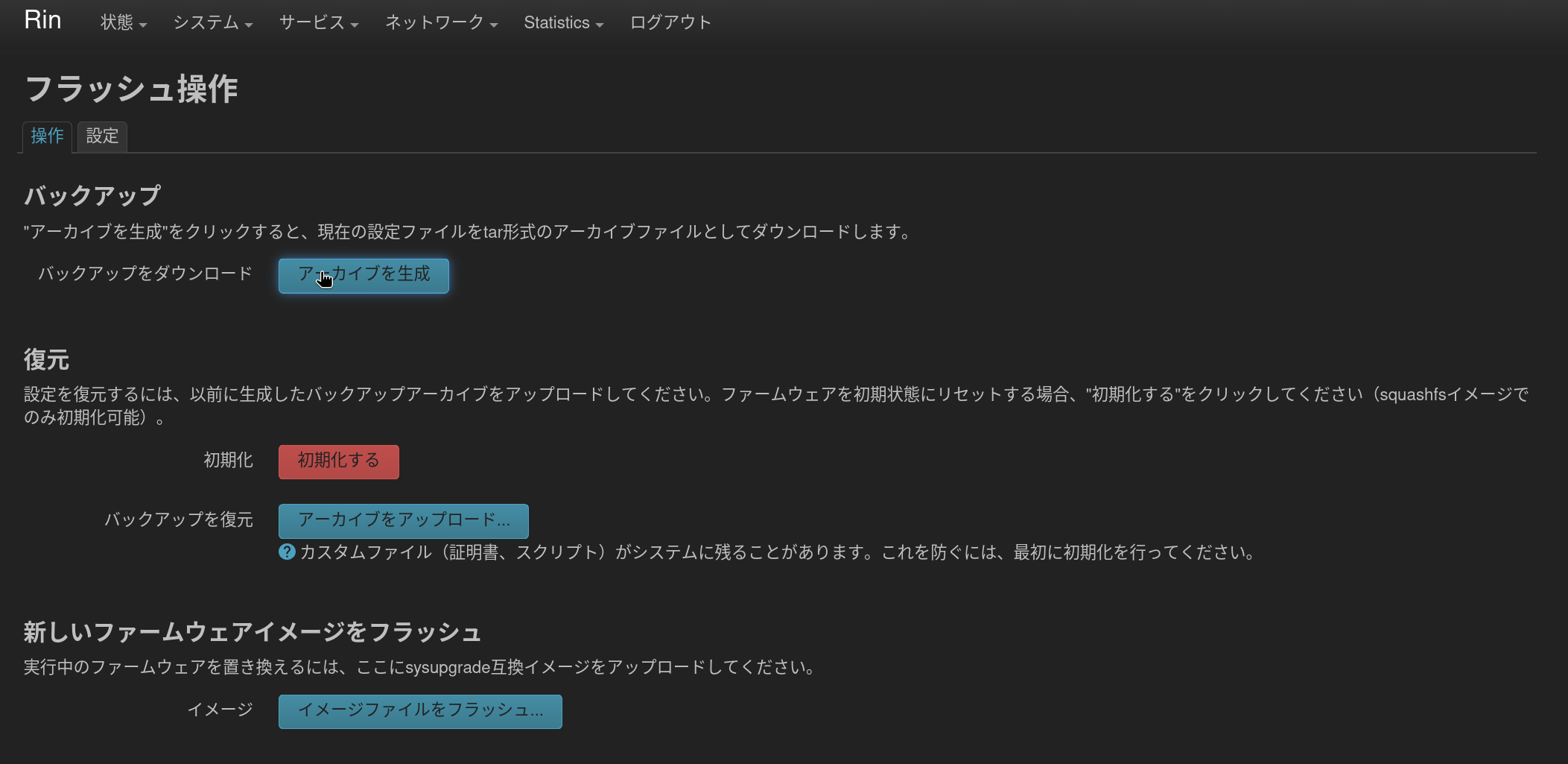
CLIでも次のように設定ファイルのバックアップが生成できる
❯ sysupgrade --create-backup /tmp/backup.tar.gz
Wed Aug  5 11:44:41 JST 2026 upgrade: Saving config files...
中身はこんな感じ
- バックアップされるのは設定ファイルが中心
- /root 配下や /etc/wireguard 配下の鍵とかは、別途手動でバックアップしたほうがいいかも
- /root 配下の .config/ とかの隠しディレクトリに注意
❯ tree
.
├── etc
│   ├── collectd.conf -> /var/etc/collectd.conf
│   ├── config
│   │   ├── adblock
│   │   ├── aria2
│   │   ├── attendedsysupgrade
│   │   ├── collectd
│   │   ├── dhcp
│   │   ├── dropbear
│   │   ├── etherwake
│   │   ├── firewall
│   │   ├── fstab
│   │   ├── https-dns-proxy
│   │   ├── luci
│   │   ├── luci_statistics
│   │   ├── network
│   │   ├── nginx
│   │   ├── nginx.apk-new
│   │   ├── openssl
│   │   ├── rpcd
│   │   ├── system
│   │   ├── ttyd
│   │   ├── ubihealthd
│   │   ├── ubootenv
│   │   ├── uhttpd
│   │   └── zerotier
│   ├── containers
│   │   ├── containers.conf
│   │   └── storage.conf
│   ├── crontabs
│   │   └── root
│   ├── dnsmasq.conf
│   ├── dropbear
│   │   ├── dropbear_ed25519_host_key
│   │   └── dropbear_rsa_host_key
│   ├── fw_env.config
│   ├── group
│   ├── hosts
│   ├── inittab
│   ├── luci-uploads
│   ├── nftables.d
│   │   ├── 10-custom-filter-chains.nft
│   │   └── README
│   ├── nginx
│   │   ├── fastcgi_params
│   │   ├── koi-utf
│   │   ├── koi-win
│   │   ├── mime.types
│   │   ├── nginx.conf
│   │   ├── restrict_locally
│   │   ├── scgi_params
│   │   ├── uci.conf -> /var/lib/nginx/uci.conf
│   │   ├── uci.conf.template
│   │   ├── uwsgi_params
│   │   └── win-utf
│   ├── owut.d
│   │   └── pre-install.sh
│   ├── passwd
│   ├── profile
│   ├── profile.d
│   │   ├── 00-passwordless-root.sh
│   │   ├── apk-cheatsheet.sh
│   │   ├── btop.sh
│   │   ├── busybox-history-file.sh
│   │   └── sys_bashrc.sh
│   ├── rc.local
│   ├── shadow
│   ├── shells
│   ├── shinit
│   ├── ssh
│   │   ├── ssh_host_ed25519_key
│   │   ├── ssh_host_ed25519_key.pub
│   │   ├── ssh_host_rsa_key
│   │   └── ssh_host_rsa_key.pub
│   ├── sysctl.conf
│   ├── uci-defaults
│   │   └── 10_disable_services
│   ├── uhttpd.crt
│   └── uhttpd.key
└── root

14 directories, 67 files
owut(OpenWrt Upgrade Tool)でアップグレード
owut コマンドを使ってアップグレードすることで、追加で入れたパッケージやUCI/システム設定をすべて自動で引き継いだカスタムイメージをOpenWrt公式のサーバー上でビルドし、そのままCLIからアップグレードすることができる
- OpenWrt Image Builder を自動でやってくれる感じのアレかなといったところ
まずアップデートにあたって、現在のパッケージ構成やサーバー側のビルド状況に問題がないか確認する
❯ owut check --verbose
owut - OpenWrt Upgrade Tool 2026.01.13~2526d84b-r1 (/usr/bin/owut)
ASU-Server     https://sysupgrade.openwrt.org
Upstream       https://downloads.openwrt.org
Target         mvebu/cortexa72
Profile        checkpoint_v-80
Package-arch   aarch64_cortex-a72
Root-FS-type   squashfs
Sys-type       sysupgrade
Version-from   25.12.0 r32713-f919e7899d (kernel 6.12.71)
Version-to     25.12.5 r33051-f5dae5ece4 (kernel 6.12.94)
Build-commit   https://git.openwrt.org/?p=openwrt/openwrt.git;a=shortlog;h=f5dae5ece4
Build-FS-type  squashfs
Build-at       2026-06-29T12:59:20Z (~37 days ago)
Image-prefix   openwrt-25.12.5-mvebu-cortexa72-checkpoint_v-80
Image-URL      https://downloads.openwrt.org/releases/25.12.5/targets/mvebu/cortexa72
Image-file     openwrt-25.12.5-mvebu-cortexa72-checkpoint_v-80-squashfs-sysupgrade.gz
Installed      341 packages
Top-level      194 packages
Default         34 packages
User-installed 161 packages (top-level only)

Package version changes:
  adblock                             4.5.2-r1                                    4.5.7-r1
  apk-mbedtls                         3.0.2-r5                                    3.0.5-r3
  attendedsysupgrade-common           9                                           10
  base-files                          1693~f919e7899d                             1711~f5dae5ece4
  bash                                5.3-r2                                      5.3-r4
~~~中略~~~
  uhttpd                              2025.10.03~ebb92e6b-r1                      2026.06.16~7b1bec45-r1
  uhttpd-mod-ubus                     2025.10.03~ebb92e6b-r1                      2026.06.16~7b1bec45-r1
  usbids                              0.387-r1                                    0.407-r1
  usbutils                            017-r1                                      019-r1
  xtables-nft                         1.8.10-r2                                   1.8.10-r3
  zoneinfo-core                       2025c-r1                                    2026b-r1
  zoneinfo-simple                     2025c-r1                                    2026b-r1
209 packages are out-of-date

Default package analysis:
  Default                             Provided-by
  nftables                            nftables-json

There are currently package build failures for 25.12.5 aarch64_cortex-a72:
  Feed: telephony
    asterisk-chan-sccp                Wed Aug  5 02:17:13 2026 - not installed
  Feed: video
    assimp                            Tue Aug  4 23:47:03 2026 - not installed
    glslang                           Tue Aug  4 23:00:48 2026 - not installed
    qt5base                           Wed Aug  5 02:13:18 2026 - not installed
    qt5quick                          Wed Aug  5 02:13:22 2026 - not installed
    qt5quick-controls                 Wed Aug  5 02:13:31 2026 - not installed
    qt5script                         Wed Aug  5 02:13:21 2026 - not installed
    qt5svg                            Wed Aug  5 02:13:22 2026 - not installed
    qt5translations                   Wed Aug  5 02:37:18 2026 - not installed
    qt5virtualkeyboard                Wed Aug  5 02:37:18 2026 - not installed
    vkmark                            Wed Aug  5 02:08:05 2026 - not installed
11 package build failures don't affect this device, details at
  https://downloads.openwrt.org/releases/faillogs-25.12/aarch64_cortex-a72/

It is safe to proceed with an upgrade- 特に問題はなさそう
アップグレード
パーティションの容量を指定せずupgradeしようとすると、パッケージのアップグレードに伴って容量がデカくなってしまい、結果としてデフォルトのサイズ(256MB)を超過してエラーを吐いた
❯ owut upgrade
ASU-Server     https://sysupgrade.openwrt.org
Upstream       https://downloads.openwrt.org
Target         mvebu/cortexa72
Profile        checkpoint_v-80
Package-arch   aarch64_cortex-a72
Version-from   25.12.0 r32713-f919e7899d (kernel 6.12.71)
Version-to     25.12.5 r33051-f5dae5ece4 (kernel 6.12.94)
209 packages are out-of-date
There are 0 missing and 1 modified default packages
Request hash:
  7f442fbdf4b4bd047945b30089879241a11099db29c7fab036c7b601175c7423
--
Status:   queued - 0 ahead of you
Progress:   0s total =   0s in queue +   0s in build
--
Status:   container_setup
Progress:   2s total =   0s in queue +   2s in build
--
Status:   validate_manifest
Progress:  43s total =   0s in queue +  43s in build
--
Status:   building_image
Progress: 138s total =   0s in queue + 138s in build
--
Status:   Error: Selected packages exceed device storage
Progress: 142s total =   0s in queue + 142s in build

Build failed in 142s total =   0s in queue + 142s to build:
ASU server stdout =
Checking 'true'... ok.
Checking 'false'... ok.
Checking 'working-make'... ok.
Checking 'case-sensitive-fs'... ok.
Checking 'proper-umask'... ok.
Checking 'perl-data-dumper'... ok.
Checking 'perl-findbin'... ok.
Checking 'perl-file-copy'... ok.
Checking 'perl-file-compare'... ok.
Checking 'perl-thread-queue'... ok.
Checking 'perl-ipc-cmd'... ok.
Checking 'tar'... ok.
Checking 'find'... ok.
Checking 'bash'... ok.
Checking 'xargs'... ok.
Checking 'patch'... ok.
Checking 'diff'... ok.
Checking 'cp'... ok.
Checking 'seq'... ok.
Checking 'awk'... ok.
Checking 'grep'... ok.
Checking 'egrep'... ok.
Checking 'getopt'... ok.
Checking 'realpath'... ok.
Checking 'stat'... ok.
Checking 'gzip'... ok.
Checking 'unzip'... ok.
Checking 'bzip2'... ok.
Checking 'wget'... ok.
Checking 'install'... ok.
Checking 'perl'... ok.
Checking 'python'... ok.
Checking 'python3'... ok.
Checking 'python3-distutils'... ok.
Checking 'python3-stdlib'... ok.
Checking 'file'... ok.
Checking 'which'... ok.
Checking 'ldconfig-stub'... ok.
Building images for mvebu - Check Point V-80
Packages: apk-mbedtls aria2 attendedsysupgrade-common base-files bash blkid block-mount btop busybox ca-bundle cgi-io collectd-mod-cpu
~~~中略~~~
"libc=1.2.5-r5" "kernel=6.12.94~c599301e5732eea8dd779bd6545777cf-r1"

OK: 0 B in 0 packages

Installing packages...
(  1/339) Installing libgcc1 (14.3.0-r5)
(  2/339) Installing libc (1.2.5-r5)
(  3/339) Installing libmbedtls21 (3.6.6-r2)
(  4/339) Installing libubox20260213 (2026.06.19~7dd12784-r1)
(  5/339) Installing libuclient20201210 (2026.06.07~daad21fa-r1)
(  6/339) Installing uclient-fetch (2026.06.07~daad21fa-r1)
(  7/339) Installing zlib (1.3.1-r1)
(  8/339) Installing apk-mbedtls (3.0.5-r3)
(  9/339) Installing libopenssl3 (3.5.7-r1)
( 10/339) Installing libopenssl-conf (3.5.7-r1)
~~~中略~~~
(329/339) Installing libusb-1.0-0 (1.0.29-r1)
(330/339) Installing usbids (0.407-r1)
(331/339) Installing usbutils (019-r1)
(332/339) Installing vim (9.2.0-r1)
(333/339) Installing ca-certificates (20260601-r1)
(334/339) Installing quickjs (2025.09.13-r1)
(335/339) Installing yt-dlp (2026.3.17-r1)
(336/339) Installing kmod-tun (6.12.94-r1)
(337/339) Installing libminiupnpc (2.2.8-r1)
(338/339) Installing libnatpmp1 (20230423-r2)
(339/339) Installing zerotier (1.16.0-r1)
OK: 286.0 MiB in 339 packages

Finalizing root filesystem...
add alternative: /usr/bin/sort -> /usr/libexec/sort-coreutils
add alternative: /usr/bin/scp -> /usr/sbin/dropbear
add alternative: /usr/bin/ssh -> /usr/sbin/dropbear
add alternative: /usr/bin/awk -> /usr/bin/gawk
add alternative: /sbin/ip -> /usr/libexec/ip-tiny
add alternative: /usr/sbin/ip6tables -> xtables-nft-multi
add alternative: /usr/sbin/ip6tables-restore -> xtables-nft-multi
add alternative: /usr/sbin/ip6tables-save -> xtables-nft-multi
add alternative: /usr/sbin/ip6tables-nft -> xtables-nft-multi
add alternative: /usr/sbin/ip6tables-nft-restore -> xtables-nft-multi
add alternative: /usr/sbin/ip6tables-nft-save -> xtables-nft-multi
add alternative: /usr/sbin/ip6tables-restore-translate -> xtables-nft-multi
add alternative: /usr/sbin/ip6tables-translate -> xtables-nft-multi
add alternative: /usr/sbin/iptables -> xtables-nft-multi
add alternative: /usr/sbin/iptables-restore -> xtables-nft-multi
add alternative: /usr/sbin/iptables-save -> xtables-nft-multi
add alternative: /usr/sbin/iptables-nft -> xtables-nft-multi
add alternative: /usr/sbin/iptables-nft-restore -> xtables-nft-multi
add alternative: /usr/sbin/iptables-nft-save -> xtables-nft-multi
add alternative: /usr/sbin/iptables-restore-translate -> xtables-nft-multi
add alternative: /usr/sbin/iptables-translate -> xtables-nft-multi
add alternative: /usr/bin/less -> /usr/libexec/less-gnu
add alternative: /sbin/logread -> /usr/libexec/logread-ubox
add alternative: /usr/bin/ssh -> /usr/libexec/ssh-openssh
add alternative: /usr/bin/scp -> /usr/libexec/scp-openssh
add alternative: /usr/bin/ssh-keygen -> /usr/libexec/ssh-keygen-openssh
add alternative: /bin/watch -> /usr/libexec/watch-procps-ng
add alternative: /sbin/rmmod -> /sbin/kmodloader
add alternative: /sbin/insmod -> /sbin/kmodloader
add alternative: /sbin/lsmod -> /sbin/kmodloader
add alternative: /sbin/modinfo -> /sbin/kmodloader
add alternative: /sbin/modprobe -> /sbin/kmodloader
add alternative: /usr/bin/wget -> /bin/uclient-fetch
add alternative: /usr/bin/lsusb -> /usr/libexec/lsusb-usbutils
Enabling adblock
Enabling aria2
Enabling boot
Enabling collectd
Enabling cron
Enabling dnsmasq
Enabling done
Enabling dropbear
Enabling etherwake
Enabling firewall
Enabling fstab
Enabling gpio_switch
Enabling https-dns-proxy
Enabling led
Enabling log
Enabling luci_statistics
Enabling network
Enabling nginx
Enabling odhcpd
Enabling openssl
Enabling packet_steering
Enabling podman
Enabling rpcd
Enabling sshd
Enabling sysctl
Enabling sysfixtime
Enabling sysntpd
Enabling system
Enabling ttyd
Enabling ubihealthd
Enabling ucitrack
Enabling uhttpd
Enabling umount
Enabling urandom_seed
Enabling urngd
Enabling zerotier

Building images...
Parallel mksquashfs: Using 16 processors
Creating 4.0 filesystem on /builder/build_dir/target-aarch64_cortex-a72_musl/linux-mvebu_cortexa72/root.squashfs, block size 262144.
[=============================================================/] 6234/6234 100%

Exportable Squashfs 4.0 filesystem, xz compressed, data block size 262144
        compressed data, compressed metadata, compressed fragments,
        no xattrs, compressed ids
        duplicates are removed
Filesystem size 81505.94 Kbytes (79.60 Mbytes)
        27.75% of uncompressed filesystem size (293721.53 Kbytes)
Inode table size 43802 bytes (42.78 Kbytes)
        22.04% of uncompressed inode table size (198698 bytes)
Directory table size 58508 bytes (57.14 Kbytes)
        45.58% of uncompressed directory table size (128355 bytes)
Number of duplicate files found 64
Number of inodes 5919
Number of files 5013
Number of fragments 195
Number of symbolic links 639
Number of device nodes 1
Number of fifo nodes 0
Number of socket nodes 0
Number of directories 266
Number of hard-links 0
Number of ids (unique uids + gids) 1
Number of uids 1
        unknown (0)
Number of gids 1
        unknown (0)
Creating filesystem with parameters:
    Size: 109051904
    Block size: 4096
    Blocks per group: 32768
    Inodes per group: 6656
    Inode size: 256
    Journal blocks: 1024
    Label: rootfs
    Blocks: 26624
    Block groups: 1
    Reserved blocks: 0
    Reserved block group size: 7

ASU server stderr =
Pseudo file "dev" exists in source filesystem "/builder/build_dir/target-aarch64_cortex-a72_musl/root-mvebu/dev".
Ignoring, exclude it (-e/-ef) to override.
error: ext4_allocate_best_fit_partial: failed to allocate 4784 blocks, out of space?
make[3]: *** [/builder/include/image.mk:426: /builder/build_dir/target-aarch64_cortex-a72_musl/linux-mvebu_cortexa72/root.ext4] Error 1
make[2]: *** [Makefile:288: build_image] Error 2
make[1]: *** [Makefile:185: _call_image] Error 2
make: *** [Makefile:357: image] Error 2

Traceback (most recent call last):
  File "/app/.venv/lib/python3.14/site-packages/rq/worker/base.py", line 1550, in perform_job
    return_value = job.perform()
  File "/app/.venv/lib/python3.14/site-packages/rq/job.py", line 1368, in perform
    self._result = self._execute()
                   ~~~~~~~~~~~~~^^
  File "/app/.venv/lib/python3.14/site-packages/rq/job.py", line 1428, in _execute
    result = self.func(*self.args, **self.kwargs)
  File "/app/asu/build.py", line 500, in build
    result = _build(build_request, job)
  File "/app/asu/build.py", line 355, in _build
    report_error(job, "Selected packages exceed device storage")
    ~~~~~~~~~~~~^^^^^^^^^^^^^^^^^^^^^^^^^^^^^^^^^^^^^^^^^^^^^^^^
  File "/app/asu/util.py", line 338, in report_error
    raise RuntimeError(msg)
RuntimeError: Selected packages exceed device storage

ERROR: Build failed with status 500 (--version-to 25.12.5 --device mvebu/cortexa72:checkpoint_v-80:squashfs)
The above errors are often due to the upgrade server lagging behind the
build server, first suggestion is to wait a while and try again.
サイズを512MBに指定してやりなおしたら成功した
owut upgrade -S 512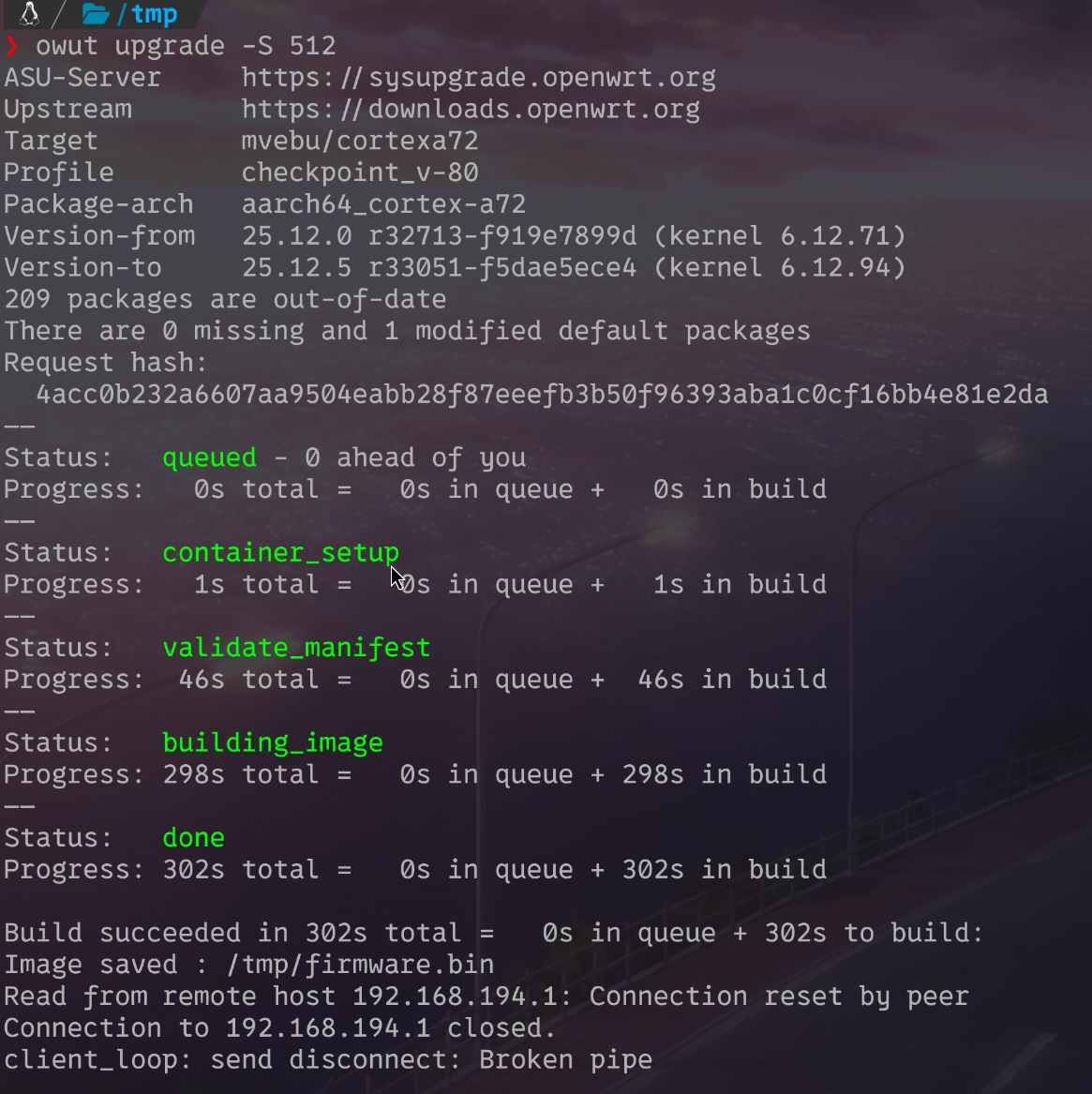
サーバー上でのビルドが完了すると、自動的にファームウェアの適用が走って再起動します。